Roofing CRM with an AI office built in
The whole roofing company in one system, starting with the phone.
Blue Collar Lead is software for running a roofing company, with the AI built into it rather than bolted on. The AI answers your calls and texts around the clock, asks the questions you choose, and books the estimator who covers that address. The same system then carries the job: the built-in roofing CRM, crew photos and walkthrough reports, estimates from EagleView, signed contracts, invoices, the hail map, time cards and profit per job.
That number is a real AI line, not a recording. Call it, tell it your roof is leaking, and let it book you an appointment. Ninety seconds, and it's the whole pitch.
$997/mo, one plan. No annual contract. Calls live the same day.
- The phone is handled, 24/7. At 2am, on a Sunday, while you're up on a roof. It books the estimator whose territory the address is in and who is actually free, not whoever is first in a list.
- The job is filled in from the first call. Your own job fields, like insurance claim or active leak, are asked on the call and written into the job. Nobody retypes the phone.
- One bill instead of a stack. CRM, AI receptionist, photo app, e-signature, estimating and hail maps for the whole company at $997 a month, with no per-user fees. See everything it does.
Based on real calls. Customer details are made up.
What it runs
From the first ring to the paid invoice.
Most roofing software is a CRM that waits for somebody to type into it. Here the AI fills the CRM in, and the CRM tells the AI what to ask.
-
Win the work
Calls and texts answered 24/7. Web forms, the website texting button and lead emails from Angi, Thumbtack and HomeAdvisor land in one place, and new web leads get a call back.
The AI office -
Book it right
Service areas you draw, each rep's work days and live calendar, travel gaps and daily limits. Existing customers can check, move or cancel their own appointment.
Scheduling -
Do the work
Boards, tasks and team chat. Stamped photos, checklists, walkthrough video and a talk-and-snap report the AI writes. EagleView to material list to proposal, and contracts signed online.
CRM and jobs -
Get paid and see it
Invoices through your own Stripe or QuickBooks, review requests when a job finishes, time cards, and reports on close rate, lead sources and profit per job.
Money and reports
Your questions, asked on the call, written into the job.
Add the job fields your company cares about and tick AI asks this. Once anything the caller wants is booked, the AI asks them, one at a time, on inbound calls, lead call-backs and texts. It skips what the caller already said and only accepts answers that fit the field, so the estimator opens a job that is already filled in.
- Your fieldActive leak?Yes or No · AI asks this
- On the call“Is it dripping right now?”“No, just the stain.”
- In the jobActive leak: NoNoted as recorded on the call
See it before you call it
One homeowner, from the first call to a paid job.
Recorded on the real dashboard with a made-up roofing company. Sophie answers Linda's call and books her, asks the company's own questions and fills in the job, then the roof report, estimate, contract, invoice, crew time, review and profit, plus storms, logins and the API.
Here's what a missed call actually costs you.
Roofing calls do not wait for office hours, and a homeowner who reaches voicemail usually dials the next name on the list.
The calls that come in when nobody is at a desk
Evenings, weekends, lunch, the middle of a tear-off. Those calls get answered the same way as a Tuesday morning, with no voicemail.
The second caller during a storm
When the office is already on the phone, the next caller is not put on hold. The AI takes several calls at the same time.
An appointment, not a message
Not a note to call back. An actual appointment on the calendar, with the address, the problem and the insurance situation already captured.
Twelve months of the plan is $11,964, about the price of one $12,000 roof. Weigh that against the jobs that go to voicemail today.
One call, from hello to a booked estimator.
An answering service ends at "I'll pass the message along." This is what happens in the ninety seconds after that, without anyone in your office touching it.
It picks up
"There's a stain on my bedroom ceiling and shingles in the yard."
- Answers straight away, no hold, no voicemail
- Works out repair or replacement, storm or wear, insurance or cash
- Takes the property address and reads it back
It works out who should go
Marietta sits in the territory two of your estimators cover.
- Matches the address to the service areas you drew
- Finds the reps assigned to that territory
- Checks their calendars, with a travel buffer
- Follows your priority order when both are free
It books that person
Thursday 9:00 AM, on Dave's calendar. Not the company's.
- Offers only times that estimator can genuinely take
- Writes the appointment to their calendar
- Creates the customer and the job in your CRM
- Emails the homeowner their confirmation
It keeps the office straight
- Texts your team the time, the address and the job notes
- Can text the homeowner a reminder before the visit, if you switch it on
- If they call back, it recognises them, and can tell them where their job stands when your job data is current
- Reschedules and cancellations stay correct here and in connected systems that support appointment updates
You are not paying $997 for someone to answer a telephone. You are paying for the hour of office work that used to sit behind every one of those calls.
Use our roofing CRM, or connect yours.
Blue Collar Lead includes the customer and job system your team needs. If your office prefers an existing CRM, connect a supported provider and use the capabilities listed below.
| What you run | Reads availability | Books the job | Imports your team | Knows your customers |
|---|---|---|---|---|
| Blue Collar Lead CRM | Via your calendar | Yes | Built in | Yes |
| GoHighLevel | Yes | Yes | Yes | Yes |
| JobTread | Use your calendar | Yes, as a dated task | Yes | After first sync |
| Jobber† | Use your calendar | Built, not run live | Yes | After first sync |
| AccuLynx* | Not launch-ready | Not launch-ready | Not launch-ready | Not launch-ready |
| JobNimbus† | Use your calendar | Built, not run live | Yes | No |
| Google Calendar | Per estimator | Yes | Add them in Settings | Pair with a CRM |
| Microsoft Outlook | One shared calendar | Yes | Add them in Settings | Pair with a CRM |
The built-in CRM is ready for the actual job. It keeps customers, configurable pipelines, worksheets with cost and margin, insurance details, payments, measurements, private photos and documents, notes, tasks and role-based access together. Prefer another CRM? Team and booking sync are available where the provider supports them. †Built against the provider's API and not yet run on a live roofing account. *AccuLynx cannot be connected yet: its import has not run on a live account and booking writes are switched off. AccuLynx requires its AppConnections add-on for any API access.
Your company. Your rules. Not ours.
Most software makes you rebuild how you work to suit it. This one is configured to match how your company already runs.
Decide how much it's allowed to do
Full autopilot books straight onto the calendar during the call. Suggest-and-confirm texts you the proposed time and waits for your yes. Or turn booking off and it just takes a proper message.
Answer everything, or only what you miss
Run it on every call, or forward on no-answer so your office keeps answering and the AI only picks up what would have hit voicemail. Nights, weekends, and the second caller during a storm.
Set who covers where, and who goes first
Draw your service areas, assign your estimators to them, and set the order when more than one covers a territory. The AI books inside those rules.
New web lead? It calls them
A form filled in at 11pm is saved immediately. The call waits until the homeowner's legal contact window opens in the morning, and once your texting number is approved a text reaches them first. In the day, you choose the delay; the AI calls, then follows up by text when the call cannot connect.
It recognises your existing customers
A returning homeowner is recognised from your own calls, bookings and jobs. When their job lives in Blue Collar Lead, or in GoHighLevel, JobTread or Jobber with a current sync, it can tell them where it stands. If it can't verify who it's speaking to, it takes a message rather than guessing.
Your team hears about it immediately
The moment a booking is made your team gets a text with the time, the address and the notes, and when the call ends an email follows with the summary, the recording and whether it's a claim. Reschedules and cancellations update connected systems that support appointment changes.
Everything it does, and a page for each one.
One plan covers all of it. Each page is the honest version: what it handles, what still needs a person, and what you have to connect for it to work.
AI roofing secretary
Answers every call in a natural voice, qualifies the job the way an office manager would, and books the estimate before hanging up.
Roofing answering service
Nights, weekends and the second caller during a storm. It takes several calls at the same time, so nobody sits in a hold queue.
Hail map and storm reports
Radar-estimated hail swaths over your territory, with roof and address dots underneath so you know which streets to inspect first.
Compare answering services
What an AI answering service does that a human call centre cannot, and the parts where a person is still better.
Appointment booking
Reads your real calendar mid-call, offers only times the right estimator can make, and books the estimate before they hang up.
Roofing CRM
Customers, jobs, appointments, photos and paperwork in one file, filled in by the call rather than by your office manager.
AI texting
Two-way texting that answers homeowners, books estimates in the thread, and lands in one inbox your office shares.
Lead response
Form, email and Google Local Services leads in one pipeline, with spam filtered out and every real lead called back fast.
Review management
Asks for the review by text the day the job finishes, shows everyone the same review link, and puts your ratings on one screen.
Reports
Which lead sources turn into won jobs, what each estimator closes, and what is sitting in your pipeline.
Roof estimates
An EagleView report becomes a priced, branded proposal built on your own costs, ready for the homeowner to sign.
Integrations
GoHighLevel, JobTread, Jobber, Google, Outlook, Stripe and QuickBooks, with an honest grid of what each can do today.
Job photos and video
Stamped photos, markup, 10-minute walkthrough video, photo checklists, reports, certificates and share links, all on the job.
Invoices and payments
Invoices built on the job and sent through your own Stripe or QuickBooks, with the payment recorded back on the job.
Contracts and signatures
Upload your own contract, place the fields once, and have it signed on a phone and linked to the job.
Job photos, built in
The photo app your crews pay for separately, inside every job.
Stamped photos, markup, walkthrough video, checklists, reports and certificates of completion, on the same job as the call, the contract and the invoice. Every login gets it. No second app, no per-user fee.
- Proof on every photoDate, time and GPS stamped in the corner, and the stamp says where the photo was actually taken.
- Mark it upArrows, circles, boxes, text, crop and rotate. The original photo is always kept.
- Walkthrough video, up to 10 minutesWhat you say is written down and shown as captions, and a circle you draw stays on the spot as you walk.
- Photo checklistsEvery shot the crew has to take, ticked off with who and when, plus yes or no, ratings and notes.
- Reports and share linksA PDF with your company on it, or a link the adjuster opens with no login. Turn it off any time.
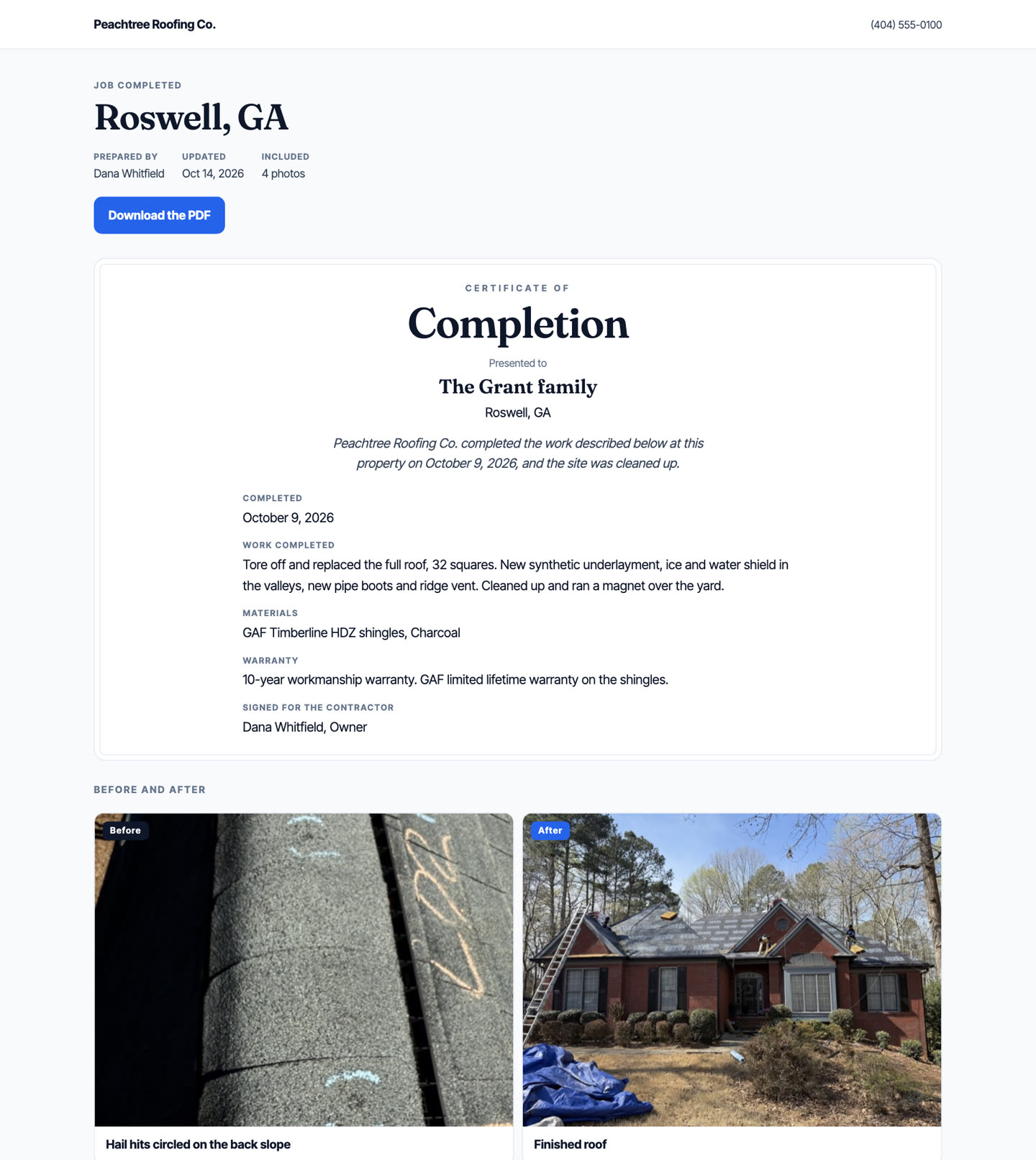
- Certificate of completionEach Before beside its After, texted or emailed to the homeowner from your own number.
- Homeowners send you photosText them a link, and the damage photos land on the job before you drive out.
- Before and after cameraA see-through copy of the Before photo lines up the After shot.
- Comments, tags and searchTalk about one photo, tag a teammate, and find any photo by its tag or note.
- No signal on the roofPhotos wait on the phone and upload by themselves when the signal comes back.
- Subcontractors and the time clockPut an outside crew on a job and they see that job only, never the homeowner's phone or prices. Crews clock in on their phone, and payroll exports in one click.
For comparison, CompanyCam's Crew plan is $149 a month for three users plus $34 for each extra user, so a crew of eight is $319 a month, on top of your CRM (companycam.com/pricing, checked October 13, 2026). Here it comes with the $997 plan.
Know which streets radar says took hail before you knock them.
Put in any address and get the storm history for that property: NOAA radar's estimate of the largest hail over the area around it, plus the ground reports nearby, not "there were storms in your county." Only an inspection confirms roof damage.
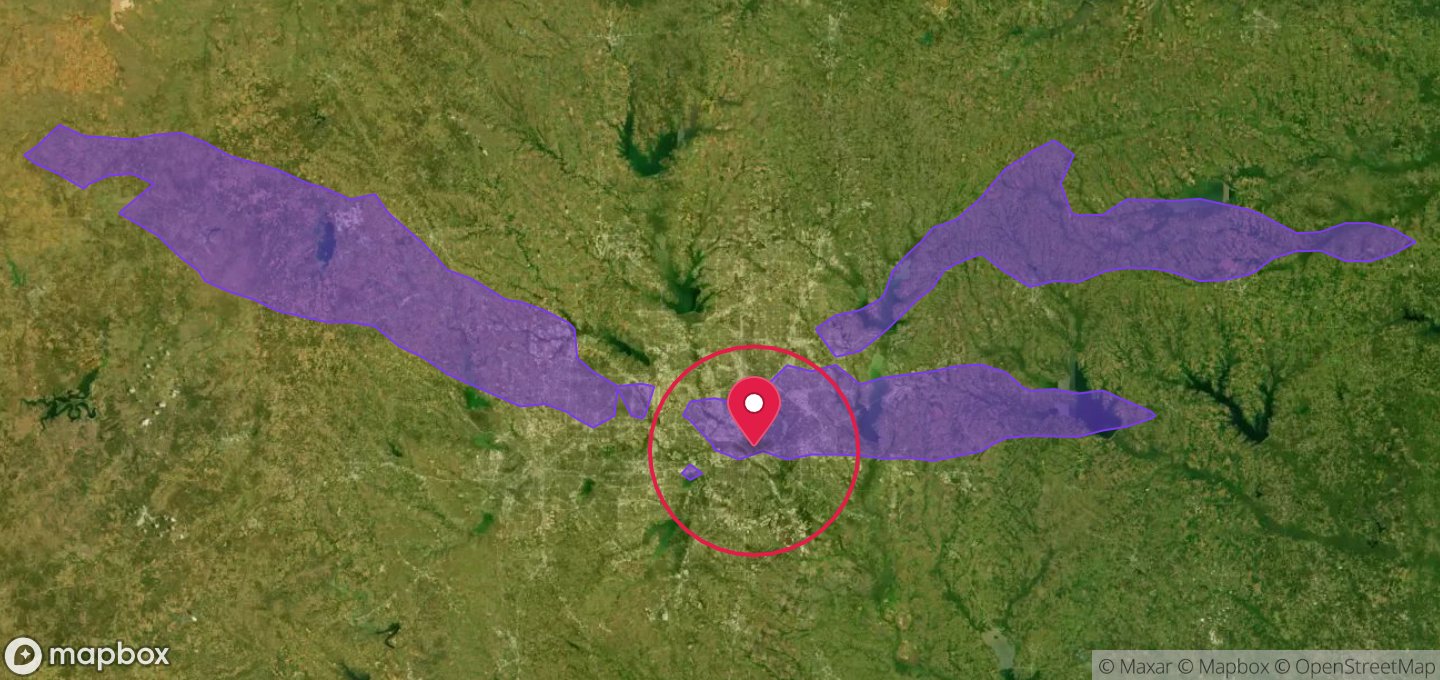
Downtown Dallas, TX 75201
- Radar-estimated hail over this address
- 0.5"
- Date it hit
- 28 Apr 2026
- Worst nearby event
- 3" hail, 26 Apr
- Peak wind recorded
- 60 mph
- Radar source
- NOAA MRMS, 1 km
The difference that matters on a doorstep: county-level hail reports tell a homeowner a storm happened somewhere near them. This tells them what radar estimated over their own street, on what day, and hands them a report they can send to their adjuster.
One price. The whole company.
No per-seat pricing, no setup fee, no annual contract. Every estimator, every territory, every call.
Everything
$997/month
- Every inbound call answered, day and night
- Books the right estimator by territory and real availability
- Built-in roofing CRM or a supported CRM connection
- Fast call-back to every real web lead
- Appointment confirmations, plus reminder texts if you want them
- Two-way AI texting and supported CRM sync included
- Job photo tools built in: checklists, walkthrough video, reports, certificates and share links
- 1,000 AI minutes included. Additional minutes are billed at our standard per-minute rate
Calls live the same day. Cancel any time. Photo and video storage: 25 GB included, then under 2 cents per extra gigabyte a month (100 GB more is about $1.65).
Custom
Built for you
Priced to the project
- Everything in the $997 plan
- Connected to the software you already run, whatever it is
- Workflows built around how your office works
- Your own reports, forms and AI call scripts
- Built, tested and looked after by our team
Tell us what you need. We quote the build before anything starts.
An office manager answers one call at a time and goes home at five.
What the same office costs elsewhere.
Built for roofing companies doing $1 million to $5 million a year: enough estimators to miss calls, not enough to staff a phone desk. Here is the same job priced five ways.
| Company | What it costs | Price goes up per user | AI answers and books calls | Roofing jobs built in |
|---|---|---|---|---|
| Blue Collar Lead | $997 a month | No. Every estimator and office login included | Included, 1,000 minutes a month | Pipeline, worksheets, insurance, photos, contracts, invoices |
| AccuLynx | Not published. A roofing company we work with pays $1,800 a month, and texting, e-signatures, the customer portal, payments and app connections are extra monthly add-ons | Yes. A monthly fee for every user license | Not on its feature list | Yes |
| JobNimbus | Not published | Yes. Account fee plus per-user fees by role | AssistAI, billed separately per phone number and per minute | Yes |
| Leap | From $298 a month for one user, one-year contract | Yes, $99 a month for each added user | Not on its pricing page | Yes |
| GoHighLevel | $97, $297 or $497 a month, plus a charge for every call, text, email and AI minute | No, but usage, add-ons and agency markups do | Paid add-on, $50 to $97 a month per account, you set it up | General marketing CRM you build out |
Prices are from each company's own website, checked October 13, 2026, at the no-contract monthly rate where one is offered. AccuLynx and JobNimbus do not publish their prices; AccuLynx's own terms bill a monthly fee for each user license, its add-ons (texting, documents and e-signatures, customer portal, payments, app connections and more) are billed monthly on top, and the $1,800 is what one roofing company we work with pays each month. GoHighLevel's plans include unlimited users, but calls, texts, email and AI are billed on top, its AI Employee is $50 to $97 a month per location, and an agency reselling it sets its own price. Adding a separate answering service instead: Smith.ai's AI receptionist is $150 a month for 75 calls, and Ruby's live receptionists are $720 a month for 200 minutes. Already on GoHighLevel? Blue Collar Lead can send its bookings there.
The questions roofers actually ask.
Straight answers, including the ones about what it can't do.
What is an AI office manager for a roofing company?
An answering service takes a message. An AI office manager does the work that follows it. Blue Collar Lead answers the phone in a natural voice, qualifies the homeowner, works out which service area the property falls in, checks which estimator covering that territory is genuinely free, books that person, and records the customer and appointment in its built-in roofing CRM. It can also push new bookings to supported connected systems.
Do we have to switch CRMs to use it?
No. Blue Collar Lead includes a built-in roofing CRM, so you can run customer and job records here without buying another CRM. If you prefer the system you already use, GoHighLevel and JobTread can receive new bookings, and the Jobber and JobNimbus connections are built but have not yet run on a live roofing account. AccuLynx is not launch-ready, and AccuLynx requires its AppConnections add-on for any API access. Google Calendar and Microsoft Outlook connect for booking. Capabilities vary by provider.
How does it decide which estimator gets the appointment?
By the rules you set, not at random. It takes the property address, matches it to the service areas you have drawn, and finds the reps assigned to that territory. On Google Calendar, GoHighLevel or Jobber it checks each of those reps' own calendar (Outlook connects one shared calendar), applies a travel buffer, and follows your priority order when more than one person covers the area. If nobody who covers that territory is free, it offers the homeowner a different time rather than sending someone who does not work that area.
Does the AI have to book appointments on its own?
No. There are three modes. Full autopilot books directly onto the calendar during the call. Suggest and confirm has the AI gather everything and text you a proposed time, so nothing is scheduled until you approve it. Booking can also be turned off entirely so the AI only takes a detailed message.
Can it answer only the calls we miss?
Yes. Set your line to forward on no-answer and your office keeps answering as normal, with the AI picking up only what would have gone to voicemail: after hours, weekends, or when every line is busy. It can also answer every call from the start. Because it takes several calls at the same time, nobody is put on hold during a storm surge.
What if a caller wants a real person?
It offers your team by position and name and transfers them straight away, without making them explain why first. The one exception is someone selling something who asks for the owner: they get a message taken instead.
What happens if it is not sure who is calling?
It takes a message. A roof outlives its owner, so an address on its own can easily belong to whoever lived there before, and reading a previous owner's job or claim history to whoever bought the house is not a near miss. It asks for one more identifier, and if it still cannot be certain, or if its copy of your CRM data is not current, it says someone will call them straight back rather than guessing.
How long does setup take?
Calls can be live the same day. The system imports your business details from your website and Google Business Profile, you review them, connect a calendar or CRM, add your team, and forward your business line to the new number. Texting starts once the carrier approves your toll-free number.
Is there a guarantee?
Yes. If Blue Collar Lead has not booked a single appointment on your connected calendar in your first 30 days as a paying customer, email us within 45 days of your first payment and we will refund that first month. The guarantee is tied to appointments booked rather than jobs sold, because booking is what the system controls. Whether an estimate becomes a signed contract depends on your pricing, your estimator and the insurance adjuster.
What does it cost, and what is the minute limit?
$997 per month, including 1,000 AI talk minutes. Additional minutes are billed at our standard per-minute rate. That covers the whole company rather than per seat: every estimator, every territory, every call.
Is this better than just letting it go to voicemail?
Most homeowners do not leave a voicemail. They call the next roofer on the list. This picks up straight away at any hour, captures the address and the job, and books the inspection while the homeowner is still interested, so the lead never has to be chased.
We are a small shop with no office manager. Is it worth it?
That is the strongest case for it. When nobody is available to answer, every missed call risks the homeowner calling the next roofer. On full autopilot it answers at any hour, qualifies the job and books the inspection, so a solo owner working on a roof is replacing voicemail rather than replacing a staff member.
We already have office staff. What does this add?
Overflow, after hours, and the routing. Your office answers first and the AI catches what they cannot: the second and third caller during a storm surge, and every call after closing. It also does the part your staff do by hand today, which is working out whose territory an address is in and who is actually free to take it. You can run it as backup first, then move to suggest and confirm when you are ready.
Who is Blue Collar Lead built for?
Roofing companies doing roughly $1 million to $5 million a year, with a few estimators and an office that cannot answer every call. One price covers the whole company, so adding estimators or office staff does not raise the bill.
How does Blue Collar Lead compare with AccuLynx?
AccuLynx is a roofing CRM. It does not publish its prices, and it charges a monthly fee for every user license; a roofing company we work with pays $1,800 a month for it, and answering phone calls is not on its feature list. Blue Collar Lead is $997 a month for the whole company and includes the AI that answers calls and books the estimate, plus a built-in roofing CRM with the pipeline, worksheets, insurance details, photos, contracts and invoices.
How does Blue Collar Lead compare with GoHighLevel?
GoHighLevel is a general marketing platform. Its pricing page lists plans at $97, $297 and $497 a month with unlimited users, plus a charge for every call, text, email and AI minute, and its AI Employee add-on at $50 to $97 a month per account, and you build the roofing pipeline, call handling and booking rules yourself. Blue Collar Lead is $997 a month with the AI receptionist, roofing CRM, texting and storm maps already built for roofers. If you keep GoHighLevel, Blue Collar Lead can send its bookings there.
Do we still need CompanyCam or another photo app?
Most roofing companies will not. Stamped photos with GPS, markup, before and after, walkthrough video with captions, photo checklists, comments, tags, photo reports, share links, certificates of completion, customer photo uploads, a website gallery, a job map, a time clock with payroll export and logins for subcontractors are all included in the $997 plan for every login. What it does not do: LiDAR measuring, recording both cameras at once and 360 photos, which only a phone app can do.
Can Blue Collar Lead be our main CRM instead of AccuLynx, JobNimbus or GoHighLevel?
Yes. It is a complete roofing CRM, not only a phone tool: boards with your own stages and fields, contacts, tasks, documents, insurance details, worksheets, photos, contracts, invoices and permissions for each person. Coming from AccuLynx, a built-in import brings contacts, jobs with their job numbers and history, insurance details, estimates, invoices, payments, documents and photos; it previews first, and it has not yet been run on a live company's account. Coming from GoHighLevel, your boards and jobs are copied onto the built-in board. From anything else, contacts and your team import from a spreadsheet and your job numbers carry on. If you would rather keep your current CRM, it can stay and receive the bookings where the provider supports it. If you ever leave, the owner or a manager can download everything at any time: every record as spreadsheets plus the signed documents as PDFs.
What does the AI ask callers, and where do the answers go?
Your questions, not a generic script. You add the job fields your company wants filled, such as insurance claim, active leak or gate code, and tick the ones the AI should ask. It asks them on inbound calls, on call-backs to new web leads and over text, one at a time once anything the caller wants is booked, skips anything the caller already said, and only accepts an answer that fits the field. The answers are written into that caller's job, with a note saying they were recorded on the call, and the job is created if there was not one yet.
Call it before you decide anything.
(586) 281-5406 is a live AI line answering as a demo roofing company. Tell it your roof is leaking and let it book you in. If it doesn't sound like a person, don't buy it.
Want the detail first? What it does · How it compares · Storm tools · Questions